 Live Preview
← All Templates

SaaS
Plinth Stack — Free SaaS Template for Framer
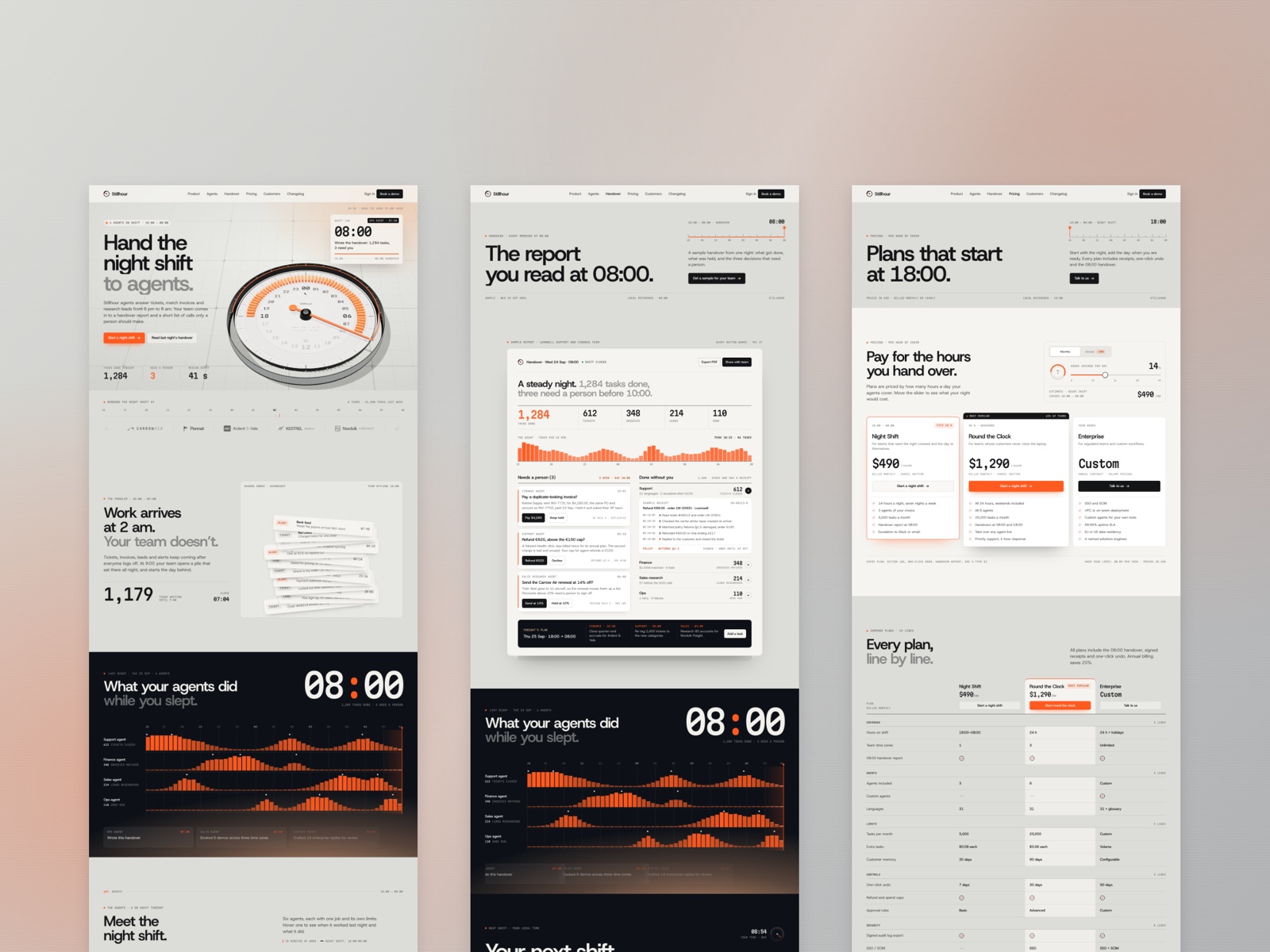
Plinth Stack is a free 13-page SaaS Framer template for B2B teams that want Trust, Docs, and Changelog on static routes. Skip it if you need CMS blog posts.
freeframerremixsaasplinth
Plinth Stack is a free thirteen-page SaaS template for Framer from an unknown marketplace author, built like a dev-tool marketing site with Platform, Docs, Trust, and Changelog routes on static frames. There is no CMS, so you edit Blog and Changelog in the canvas instead of publishing from a collection. Skip it if you need CMS posts and release notes your team updates without designers. Hubmini covers that workflow. Browse more free Framer templates on the hub, or start with the SaaS shortlist.
Who should remix Plinth Stack?
Plinth Stack fits founders and product marketers launching infrastructure, analytics, or workflow software who already know investors and procurement will ask for Trust, Docs, and a Changelog URL in the same week. The sitemap mirrors how technical buyers compare vendors: Platform explains the product, Customers holds logos, and Pricing sits on its own route for sales threads.
Walk away if your motion is content-led SEO with dozens of articles per month. Static Blog and Changelog frames will feel like friction once marketing owns publishing. Hubmini adds CMS detail routes for SaaS teams at that stage. Skip Plinth Stack when you only need a four-page agency pitch; lighter agency files on yoframer beat thirteen SaaS routes for that brief.
What Plinth Stack looks like
The live preview at plinthdev reads like a modern B2B dev product: dark-friendly panels, crisp sans type, and section rhythm closer to Linear or Vercel than a playful consumer app. Cards and metric rows give you room for integration logos and feature bullets without rebuilding grids from scratch.
Motion stays restrained so Pricing tables and Docs headings stay readable when a CTO opens the link on a phone between meetings. The honest fight is tone. A wellness brand or a colorful consumer subscription will spend an evening retokenizing color and illustration because Plinth Stack assumes sober infrastructure credibility, not lifestyle warmth.
Pages included in Plinth Stack
Thirteen pages, named as Framer lists them:
- Home: product positioning, proof, and paths into Platform, Pricing, and Contact
- Platform: capability story, feature clusters, and technical credibility for evaluators
- Pricing: plan tiers, packaging, and comparison-friendly layout for sales handoffs
- Docs: documentation-style layout for guides, API intros, or onboarding copy
- Trust: security, compliance, or reliability narrative for enterprise questionnaires
- Customers: logo wall and short proof for social validation on outbound emails
- Changelog: release history frame you update manually when you ship versions
- Blog: editorial index for product updates and SEO articles on static routes
- Company: team, mission, and hiring cues separate from the product homepage
- Contact: inquiry form and details for demos, support, or partnership requests
- Privacy: privacy policy route for forms, analytics, and data processing disclosures
- 404: friendly dead-end recovery with navigation back into the marketing funnel
- Terms: terms of service copy for trials, subscriptions, and acceptable use
That spread matters when a prospect forwards one URL and expects Trust and Docs without hunting the footer.
What is distinctive about Plinth Stack
- Docs as a first-class route. Many free SaaS templates bury documentation in a homepage accordion; Plinth Stack gives Docs its own bookmarkable URL.
- Trust beside Customers. Security narrative and logo proof sit on separate pages, which helps enterprise threads that split risk review from social proof.
- Changelog without pretending it is CMS. You get a dedicated release page even though everything is static, which suits teams that ship monthly and paste notes by hand.
- Platform page separate from Home. Paid campaigns can deep-link to Platform instead of sending evaluators through a long home scroll.
- Thirteen-route completeness. Pricing, Blog, Company, Privacy, and Terms ship together, so you are not stitching legal pages after launch night.
Framer SEO, analytics, and breakpoint tooling ship with the platform. They are not reasons to pick Plinth Stack over another SaaS file.
When to remix Plinth Stack, and when to skip
Remix Plinth Stack when you are a B2B SaaS team that needs Trust, Docs, Changelog, and Pricing on separate static routes this week, and you accept hand-editing Blog posts until you add CMS later. The unknown author still left a coherent enterprise-shaped sitemap you can re-skin fast.
Skip it when marketing must publish blog and changelog entries from collections without opening the canvas. That is Hubmini. Skip it when you only need a slim AI landing. Use the SaaS shortlist or return to free Framer templates on the hub.
Frequently Asked Questions
Quick answers about Plinth Stack, including pricing, CMS support, responsiveness, and who it is built for.
-
What kind of website is Plinth Stack best for?
- Plinth Stack is for Early-stage B2B SaaS teams that need a credible thirteen-route marketing site with pricing, trust, and docs frames before collections exist. It includes 13 pages: Home, Platform, Pricing, Docs, Trust, Customers, Changelog, Blog, Company, Contact, Privacy, 404, Terms.
-
Is Plinth Stack free or paid?
- Plinth Stack is a free Framer template. The listed price on yoframer is free.
-
Does Plinth Stack support CMS and responsive design?
- Plinth Stack does not include CMS support. It is fully responsive.
-
When should I skip Plinth Stack?
- You need CMS blog and changelog entries your marketer publishes weekly without touching frames. Hubmini ships collections. Start with Hubmini .
Featured in our SaaS roundup
10 Best Free SaaS Framer Templates in 2026
Most free SaaS templates on Framer look great in the preview and fall apart the moment you customize them. These 10 don't.